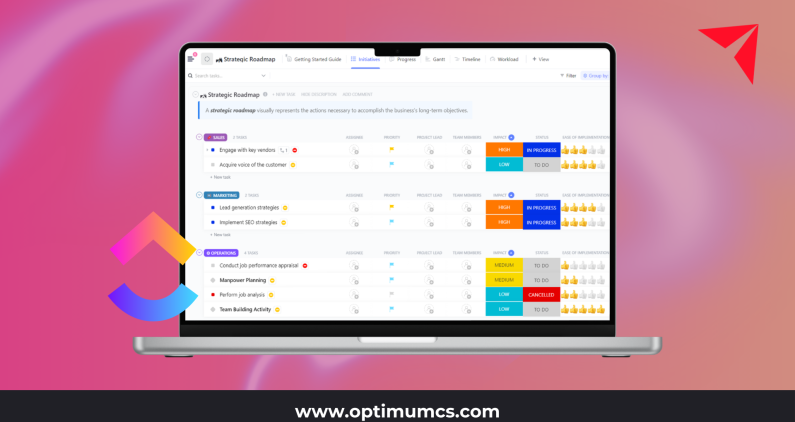
Many organizations adopt ClickUp to replace scattered spreadsheets or disconnected project trackers. The platform is flexible, fast to deploy, and easy for individual teams to adopt. But turning ClickUp into a reliable operating system for the business is a different challenge.
When ClickUp is implemented without consistent design, automation strategy, and governance, teams often struggle with duplicate work, inconsistent reporting, and automations that cause more noise than clarity. With the right structure and guidance, ClickUp can evolve from a simple task tool into the backbone of your operations.
This article explores the foundational elements that make ClickUp work at scale and how thoughtful consulting, automation, and governance transform it into a cross-functional platform that supports real business outcomes.
Designing ClickUp for Cross-Team Workflows
Scaling ClickUp begins with the structure that supports your organization. High-growth teams in industries like construction, retail, marketing, and public sector often start with isolated workspaces. Each team builds ClickUp differently, which creates silos rather than shared visibility.
Start With How Work Actually Flows
Before designing Spaces or Lists, look closely at how work moves across teams. For example:
- In construction, project initiation may move from sales to estimating to operations.
- In retail, workflows often involve merchandising, supply chain, and store operations.
- In marketing teams, work moves from intake to creative to review cycles.
- In public sector environments, approvals and documentation often travel across several stakeholders.
Mapping these handoffs helps ensure ClickUp mirrors real business processes, not hypothetical ones.
Standardization Creates Scalability
ClickUp grows quickly. Without standardization, it can become cluttered and difficult to maintain. Scalable teams focus on:
- Consistent naming conventions for Spaces, Lists, and fields
- Standardized status sets so reporting remains accurate
- Reusable templates for recurring project types
- Shared taxonomies that keep terminology aligned across departments
Standardizing these elements ensures anyone on the team can navigate the system and trust what they see.
Use ClickUp as Part of a Broader Systems Ecosystem
ClickUp should not be a standalone island. High-performing organizations integrate ClickUp with systems such as CRM platforms, ERPs, and external reporting tools. This creates a single source of truth for work status, project health, deadlines, and inputs needed by other departments.
Interconnected systems support better decisions and reduce duplicate data entry, which is a critical theme for organizations prioritizing efficiency and trusted information.
Automating Without Creating Chaos
ClickUp’s automation capabilities are powerful, but teams often introduce too many automations too quickly. The result is a noisy environment filled with unexpected notifications, tasks created without context, or automation loops that break workflows.
A thoughtful automation approach avoids this chaos and supports predictable, stable processes.
The Risks of Over-Automating
When teams build automations without a plan, they often experience:
- Conflicting rules that trigger multiple actions at once
- Notifications that overwhelm team members
- Tasks that auto-assign without clear ownership
- Breakdowns when someone changes a field tied to multiple automations
These problems grow as more teams adopt ClickUp, especially in larger organizations.
Design Automations That Support Business Logic
Effective automations are purposeful and tied to a measurable improvement. They should simplify work rather than hide complexity. Strong automation design focuses on:
- Reducing repetitive manual actions
- Creating predictable, transparent steps in workflows
- Ensuring clear ownership in every step
- Supporting SLAs, approvals, and intake routing
- Coordinating communication across teams
For example:
- In construction, when a project moves to the ready-to-bid stage, ClickUp can automatically assign work to estimators and notify project managers.
- In marketing agencies, when a task reaches client review, ClickUp can trigger templated communication and update relevant dashboards.
- In retail or consumer goods teams, exceptions can be flagged when tasks exceed deadlines so issues are surfaced before they escalate.
By keeping automations simple and tied to clear business goals, organizations prevent the complexity that often derails adoption.
Measure Automation Impact
As automations roll out, measure what matters:
- Hours saved from repetitive steps
- Faster cycle times between intake and completion
- Reduced errors in handoffs
- Improved consistency in reporting and status updates
These indicators help teams continuously refine automations so they support efficiency rather than adding unnecessary complexity.
Governance and Structure for Long-Term Success
Even the best ClickUp builds degrade over time without governance. As new people join, projects evolve, and priorities shift, the ClickUp environment needs ongoing care to stay healthy.
Why ClickUp Environments Drift
Drift is common in mid-market organizations. It often starts with:
- New teams creating their own automations or fields
- Duplicate Spaces created for similar work
- Old Lists lingering long after they are relevant
- Reports that no longer reflect updated workflows
Without governance, ClickUp slowly becomes harder to navigate, harder to trust, and harder to scale.
Governance Creates Sustainability
To maintain a clean and scalable ClickUp environment, organizations can establish:
- A platform owner who oversees structure and standards
- Department champions who support adoption within their teams
- Clear guidelines for when and how to create new Spaces or fields
- Processes for reviewing and approving changes
- A centralized library of templates
These structures give ClickUp a strong foundation that remains stable as the organization grows.
Documentation and Training Keep Teams Aligned
Consistent documentation is the difference between a well-run platform and one that constantly needs rebuilding. Effective teams maintain:
- A shared knowledge hub inside ClickUp
- Easy to follow guides and videos for onboarding
- Quarterly training or refinement sessions
Living documentation ensures ClickUp evolves with the business instead of drifting away from it.
Continuously Review and Improve
ClickUp optimization is not a one-time project. High performing organizations run periodic health checks that look at:
- Workspace usage and adoption patterns
- Automation performance and error rates
- Feedback from users and managers
- Opportunities for new integrations or dashboards
This continuous improvement mindset ensures ClickUp remains aligned with leadership priorities and changing operational needs. It also reflects a key principle shared across modern technology programs which value clarity, integration, and business aligned decision making.
Turning ClickUp Into Your Operational Backbone
ClickUp becomes a powerful operational backbone when teams invest in thoughtful design, purposeful automations, and strong governance. Instead of a simple task tracker, it becomes a centralized hub that supports consistent execution, clearer decision making, and cross team collaboration.
For mid-market companies across industries including construction, retail, marketing, public sector, and professional services, a well structured ClickUp environment creates more predictable operations and better visibility into work. With the right expertise guiding the process, ClickUp scales with the organization and supports long term success.
If your team is ready to turn ClickUp into a true operational system rather than a task list, investing in intentional design and consulting can help you get there faster and with far less friction.
About Optimum
Optimum is a proud ClickUp Partner and an award-winning IT consulting firm, providing AI-powered data and software solutions and a tailored approach to building data and business solutions for mid-market and large enterprises.
With our deep industry expertise and extensive experience in data management, business intelligence, AI and ML, and software solutions, we empower clients to enhance efficiency and productivity, improve visibility and decision-making processes, reduce operational and labor expenses, and ensure compliance.
From ClickUp consulting to application development and system integration to data analytics, artificial intelligence, and workflow automation, we are your one-stop shop for your software consulting needs.
Reach out today for a complimentary discovery session, and let’s explore the best solutions for your needs!
Contact us: info@optimumcs.com | 713.505.0300 | www.optimumcs.com